Requerimientos para autoritativos o resolvers on-premise
Planisys will be responsible for preparing on-premise servers to become part of the infrastructure associated with a PDNS Reseller or Tenant.
Note
Se requiere instalar un servidor Debian 13.x en inglés con locale UTF-8, NO instalar ningún paquete, y en la medida que no contradiga las políticas de la empresa el firewal debe tener habilitado las IPs de Planisys en los puertos que se detellan mas adelante..
Warning
Planisys will handle the installation and hardening of the server once it is delivered to Planisys with root access.
Warning
Si realizan NAT, la IP de entrada y salida deben ser la misma.
In Case of an External Firewall
At a minimum, access must be allowed from the IPs 190.185.104.222, 209.127.217.3, 190.185.104.132, 190.185.107.248, 179.63.248.252, 179.63.248.250, 179.63.248.92, 2803:bc00::81 on ports 22022 and 53 (incoming).
Luego el autoritativo o resolver deberá tener abierto siempre al mundo los siguientes puertos entrantes y salientes:
Warning
53 UDP - DNS puro
53 TCP - DNS fallback
853 TCP - DoT (RFC 7858)
853 UDS - DNS over QUIC
443 TCP - DoH (RFC 8484)
8443 TCP outbound connection initiator
TCP 80 if certificates are not available, for the Let’s Encrypt ACME HTTP-01 challenge
TCP 22022 for SSH instead of the default port 22
Las restricciones de acceso al resolver o autoritativo a nivel aplicación en los puertos 53/853/443 estarán dadas en cuanto se declare en la interfaz web los puertos permitidos. Si el cliente desea agregar estas mismas restricciones declaradas en el portal PDNS a nivel firewall externo, puede hacerlo pero se perdería la información SIEM si es que se quisiese utilizarla.
Locale
The Debian locale must be en_US.UTF-8, installed in American English (US).
Sources List
After installation, the /etc/apt/sources.list file should look like this:
deb http://deb.debian.org/debian trixie main contrib non-free-firmware
deb http://deb.debian.org/debian trixie-updates main contrib non-free-firmware
deb http://security.debian.org/debian-security trixie-security main contrib non-free-firmware
Selección del hardware
Since the resolver must compute DNSSEC hashes every time it resolves a domain starting from the root nameservers, it is important to select appropriate hardware.
For this purpose, in Linux we recommend running the following command:
grep -o -w 'aes|sha\_ni|pclmulqdq|rdseed|rdrand|avx|avx2|avx512' /proc/cpuinfo | sort | uniq
The ideal result in 2024 would include, considering SIMD (Single Instruction Multiple Data, or parallel processing of data batches):
sha_ni (DNSSEC hashing: DS/NSEC/NSEC3 using SHA-256)
aes (for DoT/DoH)
avx (ideal for validation batches)
avx2 (ideal for validation batches)
pclmulqdq (helpful for DoT/DoH)
rdrand (DNS cookies, NSEC3 randoms)
rdseed (RNG, entropy source)
avx512 (for large-scale SIMD, high-capacity resolvers)
Hardware Requirement Scale
Up to 20,000 clients 2 x VPS with 16GB RAM / 4 vCPU / 20GB SSD
Up to 100,000 clients 2 x VPS with 32GB RAM / 8 vCPU / 30GB SSD
Up to 500,000 clients 2 x VPS with 64GB RAM / 16 vCPU / 40GB SSD
Warning
When configuring the VM in a PROXMOX environment, the CPU model must be set to HOST in order to use the CPU’s native crypto-acceleration for DNSSEC operations (“CPU passthrough” mode), as shown in the following screenshot:
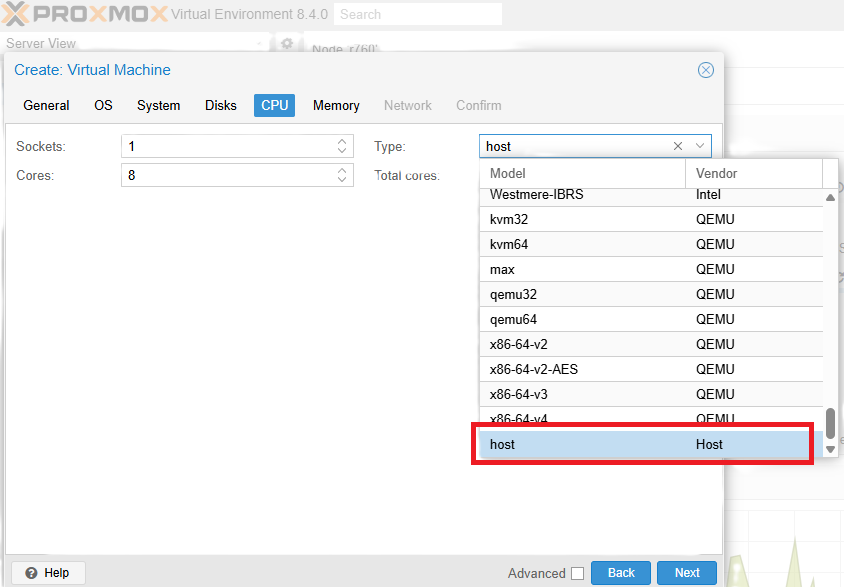
There are several installation methods available
If access to a Dell iDrac with a public IP address is provided, a username and password will be required so that Planisys can install the Operating System directly on the bare metal server and perform all the steps described in point 2 without involving the customer.
In this case, the firewall must be completely open to the Internet:
TCP 443 # HTTPS Web UI and Redfish
TCP 5900 # Virtual Console (KVM)
TCP 5901 # (sometimes used by KVM viewer)
UDP 623 # IPMI over LAN
TCP 22 # Optional SSH access
TCP 5120 # Virtual Media (if needed)
Once the installation process is completed, all these ports can be closed again. It is recommended to place the iDrac IP within a DMZ or internal LAN.
If a bare-metal, KVM, or LXC environment is already installed, the requirements are as follows:
el sistema operativo a instalar por el cliente será Debian13.x headless (sin interfaz gráfica) para acceso ssh puerto 22022 con un usuario y clave, aunque luego Planisys ingresará como root con clave pública .
If a user other than root is provided, it must be able to become root via sudo (or su - root if the root password is provided).
De esta manera, Planisys podrá ingresar al sistema remotamente como root, ejecutar ciertas operaciones manuales como ssh-keygen, agregar IPs en /root/.ssh/authorized_keys, generar un nuevo machine-id y ejecutar un playbook ansible para el setup del resolver.
Additionally, the public IP address must have reverse DNS configured, and that reverse DNS must resolve back to the public IP address. This applies to both IPv4 and IPv6.
Warning
Port 22022 must be open to the IPs listed above. Once the installation is complete, port 22 may be closed again if an external firewall is used.
The customer may follow these tutorials to create the VM. Installation can be performed either using a .iso image or through cloud-init.
Note
https://docs.planisys.net/pdns/deployment/instalacion.html <—For .iso images
Note
https://docs.planisys.net/pdns/deployment/instalacion-cloud.html <—For cloud-init based installations
If a VRRP cluster of two or more resolvers has been contracted, the available options will only be bare-metal or KVM (not LXC). Additionally, a virtual IP address must be provided. The rest of the setup is the same as in the previous section. The cluster will operate in hot/standby mode at the network level, but will use dnsdist to perform application-level load balancing between both servers whenever both are alive, thus utilizing the full computational power of the cluster.
If a SIEM solution has been contracted, Planisys will estimate the data volume in order to evaluate the most suitable hardware. The customer must also specify whether the SIEM database should be clustered. A SIEM local to the resolvers is recommended so that batches of DNSTAP (compressed DNS logs) can be transferred to the consumer responsible for injecting the data into the database, without using external bandwidth.
Processing Capacity
Warning
Each bare-metal server, up to a Dell R640, can process a maximum of 4 million Queries Per Second using NVMes with 256GB of RAM.
An equivalent server, also using NVMes for logs, can process up to 2 million Queries Per Second.
Note
Virtualized KVM servers must use “passthru” as the CPU model in order to take advantage of the full IS (Instruction Set) of the physical server. They are intended for installations below 2 million QPS (Queries Per Second).
Application Security
Warning
Planisys does not run any webserver requiring WAF protection. Port 80 is only opened for a few seconds once a week for Let’s Encrypt renewal, in case the provider does not have TLS certificates, which are required for DoT and DoH.
Warning
As for the SSH port, it is configured on port 22022 and protected with fail2ban against brute-force attacks. Accounts do not use passwords (except initially during installation) and access is only possible via public keys. Brute-force attacks have no chance of succeeding or exhausting server resources.
Warning
No firewall is required on ports 53, 853 (DoT), or 443 (DoH), since allowed networks are configured directly from the PDNS console, and the software reacts with exponential firewall backoff if someone persistently attempts to use it as an unauthorized resolver. It is important to understand that the exponential backoff extends to the /24 network of the IP attempting unauthorized resolution. Therefore, it is critical to carefully define all allowed networks and not omit any.
Last Updated on 2026-09-22